thinkphp5 TPshop项目开发中用到了富文本编辑器,选择有很多,不过资料手册文档最齐全的当然属百度的ueditor,可是发现TPshop2.05版之前使用的是ueditor1.26老版本,在上传图片时需要依赖flash,而很多新版本浏览器开始禁用flash,那么问题来了,ueditor需要升级才能兼容。
编辑器效果
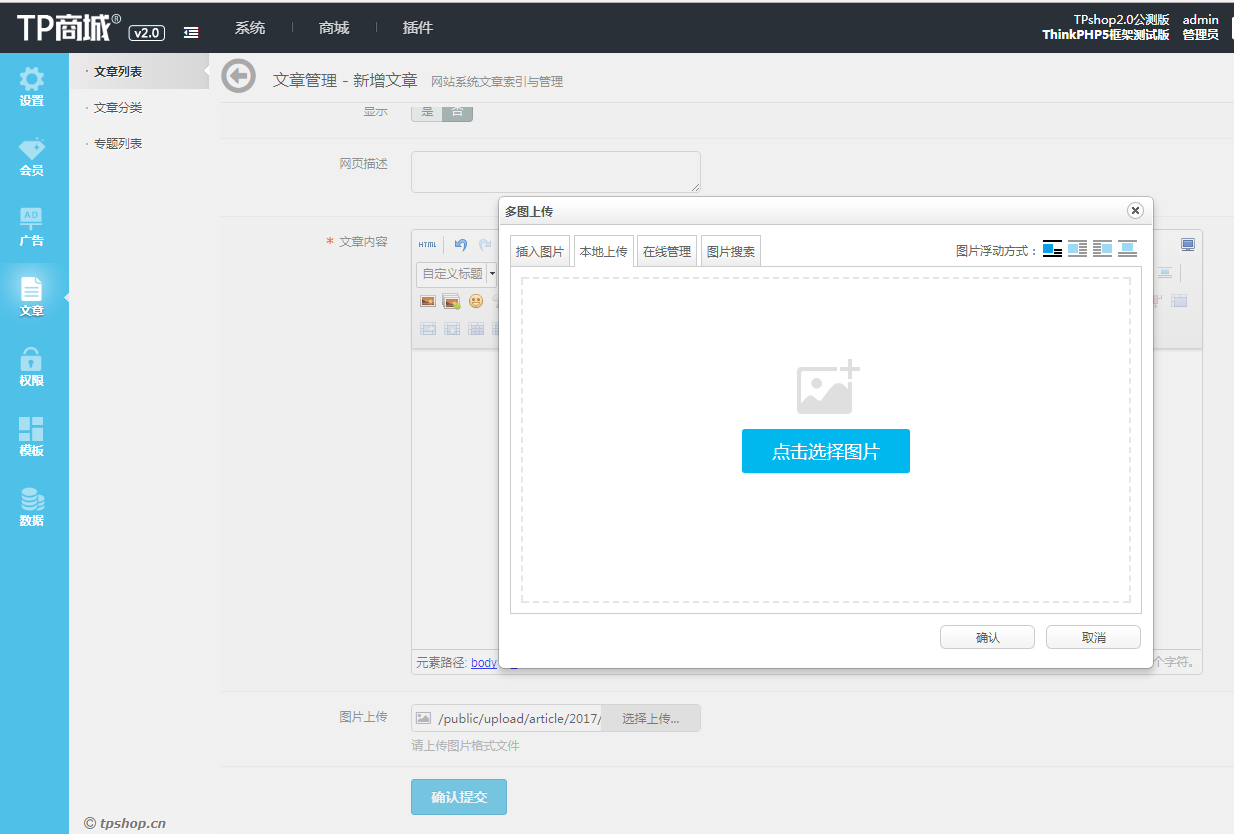
简单贴一段主要核心代码,有不妥的地方可以多多交流
<html>


<load href="__ROOT__/public/plugins/Ueditor/ueditor.config.js"/>

<load href="__ROOT__/public/plugins/Ueditor/ueditor.all.min.js"/>

<script type="text/javascript" charset="utf-8" src="__ROOT__/public/plugins/Ueditor/lang/zh-cn/zh-cn.js"></script>

<script src="__ROOT__/public/static/js/layer/laydate/laydate.js"></script>

<body>

 <textarea class="span12 ckeditor" id="post_content" name="content" title="">{$info.content}</textarea>

<script type="text/javascript">

    var url="{:url('Ueditor/index',array('savePath'=>'article'))}";

    var ue = UE.getEditor('post_content',{

        serverUrl :url,

        zIndex: 999,

        initialFrameWidth: "80%", //初化宽度

        initialFrameHeight: 300, //初化高度

        focus: false, //初始化时,是否让编辑器获得焦点true或false

        maximumWords: 99999, removeFormatAttributes: 'class,style,lang,width,height,align,hspace,valign',//允许的最大字符数 'fullscreen',

        pasteplain:false, //是否默认为纯文本粘贴。false为不使用纯文本粘贴,true为使用纯文本粘贴

        autoHeightEnabled: true

    });

</script>

</body>

</html>php接收代码class Ueditor extends Base
{
private $sub_name = array('date', 'Y/m-d');
private $savePath = 'temp/';
public function __construct()
{
parent::__construct();
//header('Access-Control-Allow-Origin: http://www.baidu.com'); //设置http://www.baidu.com允许跨域访问
//header('Access-Control-Allow-Headers: X-Requested-With,X_Requested_With'); //设置允许的跨域header
date_default_timezone_set("Asia/Shanghai");
$this->savePath = I('savepath','temp').'/';
error_reporting(E_ERROR | E_WARNING);
header("Content-Type: text/html; charset=utf-8");
}
public function index(){
$CONFIG2 = json_decode(preg_replace("/\/\*[\s\S]+?\*\//", "", file_get_contents("./public/plugins/Ueditor/php/config.json")), true);
$action = $_GET['action'];
switch ($action) {
case 'config':
$result = json_encode($CONFIG2);
break;
/* 上传图片 */
case 'uploadimage':
$fieldName = $CONFIG2['imageFieldName'];
$result = $this->upFile($fieldName);
break;
/* 上传涂鸦 */
case 'uploadscrawl':
$config = array(
"pathFormat" => $CONFIG2['scrawlPathFormat'],
"maxSize" => $CONFIG2['scrawlMaxSize'],
"allowFiles" => $CONFIG2['scrawlAllowFiles'],
"oriName" => "scrawl.png"
);
$fieldName = $CONFIG2['scrawlFieldName'];
$base64 = "base64";
$result = $this->upBase64($config,$fieldName);
break;
/* 上传视频 */
case 'uploadvideo':
$fieldName = $CONFIG2['videoFieldName'];
$result = $this->upFile($fieldName);
break;
/* 上传文件 */
case 'uploadfile':
$fieldName = $CONFIG2['fileFieldName'];
$result = $this->upFile($fieldName);
break;
/* 列出图片 */
case 'listimage':
$allowFiles = $CONFIG2['imageManagerAllowFiles'];
$listSize = $CONFIG2['imageManagerListSize'];
$path = $CONFIG2['imageManagerListPath'];
$get =$_GET;
$result =$this->fileList($allowFiles,$listSize,$get);
break;
/* 列出文件 */
case 'listfile':
$allowFiles = $CONFIG2['fileManagerAllowFiles'];
$listSize = $CONFIG2['fileManagerListSize'];
$path = $CONFIG2['fileManagerListPath'];
$get = $_GET;
$result = $this->fileList($allowFiles,$listSize,$get);
break;
/* 抓取远程文件 */
case 'catchimage':
$config = array(
"pathFormat" => $CONFIG2['catcherPathFormat'],
"maxSize" => $CONFIG2['catcherMaxSize'],
"allowFiles" => $CONFIG2['catcherAllowFiles'],
"oriName" => "remote.png"
);
$fieldName = $CONFIG2['catcherFieldName'];
/* 抓取远程图片 */
$list = array();
isset($_POST[$fieldName]) ? $source = $_POST[$fieldName] : $source = $_GET[$fieldName];
foreach($source as $imgUrl){
$info = json_decode($this->saveRemote($config,$imgUrl),true);
array_push($list, array(
"state" => $info["state"],
"url" => $info["url"],
"size" => $info["size"],
"title" => htmlspecialchars($info["title"]),
"original" => htmlspecialchars($info["original"]),
"source" => htmlspecialchars($imgUrl)
));
}
$result = json_encode(array(
'state' => count($list) ? 'SUCCESS':'ERROR',
'list' => $list
));
break;
default:
$result = json_encode(array(
'state' => '请求地址出错'
));
break;
}
/* 输出结果 */
if(isset($_GET["callback"])){
if(preg_match("/^[\w_]+$/", $_GET["callback"])){
echo htmlspecialchars($_GET["callback"]).'('.$result.')';
}else{
echo json_encode(array(
'state' => 'callback参数不合法'
));
}
}else{
echo $result;
}
}
//上传文件
private function upFile($fieldName){
$file = request()->file($fieldName);
$result = $this->validate(
['file2' => $file],
['file2'=>'image','file2'=>'fileSize:40000000'],
['file2.image' => '上传文件必须为图片','file2.fileSize' => '上传文件过大']
);
if (true !== $result || empty($file)) {
$state = "ERROR" . $result;
}else{
// 移动到框架应用根目录/public/uploads/ 目录下
$this->savePath = $this->savePath.date('Y').'/'.date('m-d').'/';
// 使用自定义的文件保存规则
$info = $file->rule(function ($file) {
return md5(mt_rand());
})->move('public/upload/'.$this->savePath);
}
if($info){
$data = array(
'state' => 'SUCCESS',
'url' => '/public/upload/'.$this->savePath.$info->getSaveName(),
'title' => $info->getFilename(),
'original' => $info->getFilename(),
'type' => '.' . $info->getExtension(),
'size' => $info->getSize(),
);
//图片加水印
if($this->savePath=='Goods/'){
$image = new \Think\Image();
$water = tpCache('water');
$imgresource = ".".$data['url'];
$image->open($imgresource);
if($water['is_mark']==1 && $image->width()>$water['mark_width'] && $image->height()>$water['mark_height']){
if($water['mark_type'] == 'text'){
$image->text($water['mark_txt'],'./hgzb.ttf',20,'#000000',9)->save($imgresource);
}else{
$image->water(".".$water['mark_img'],9,$water['mark_degree'])->save($imgresource);
}
}
}
}else{
$data = array('state' => $state.$info->getError());
}
return json_encode($data);
}
//列出图片
private function fileList($allowFiles,$listSize,$get){
$dirname = './public/upload/';
$allowFiles = substr(str_replace(".","|",join("",$allowFiles)),1);
/* 获取参数 */
$size = isset($get['size']) ? htmlspecialchars($get['size']) : $listSize;
$start = isset($get['start']) ? htmlspecialchars($get['start']) : 0;
$end = $start + $size;
/* 获取文件列表 */
$path = $dirname;
$files = $this->getFiles($path,$allowFiles);
if(!count($files)){
return json_encode(array(
"state" => "no match file",
"list" => array(),
"start" => $start,
"total" => count($files)
));
}
/* 获取指定范围的列表 */
$len = count($files);
for($i = min($end, $len) - 1, $list = array(); $i < $len && $i >= 0 && $i >= $start; $i--){
$list[] = $files[$i];
}
/* 返回数据 */
$result = json_encode(array(
"state" => "SUCCESS",
"list" => $list,
"start" => $start,
"total" => count($files)
));
return $result;
}
/*
* 遍历获取目录下的指定类型的文件
* @param $path
* @param array $files
* @return array
*/
private function getFiles($path,$allowFiles,&$files = array()){
if(!is_dir($path)) return null;
if(substr($path,strlen($path)-1) != '/') $path .= '/';
$handle = opendir($path);
while(false !== ($file = readdir($handle))){
if($file != '.' && $file != '..'){
$path2 = $path.$file;
if(is_dir($path2)){
$this->getFiles($path2,$allowFiles,$files);
}else{
if(preg_match("/\.(".$allowFiles.")$/i",$file)){
$files[] = array(
'url' => substr($path2,1),
'mtime' => filemtime($path2)
);
}
}
}
}
return $files;
}更多详细代码可以下载TPshop源码查看 